

Webhooks
Send application and stage change events to your endpoint with delivery logs and retries.
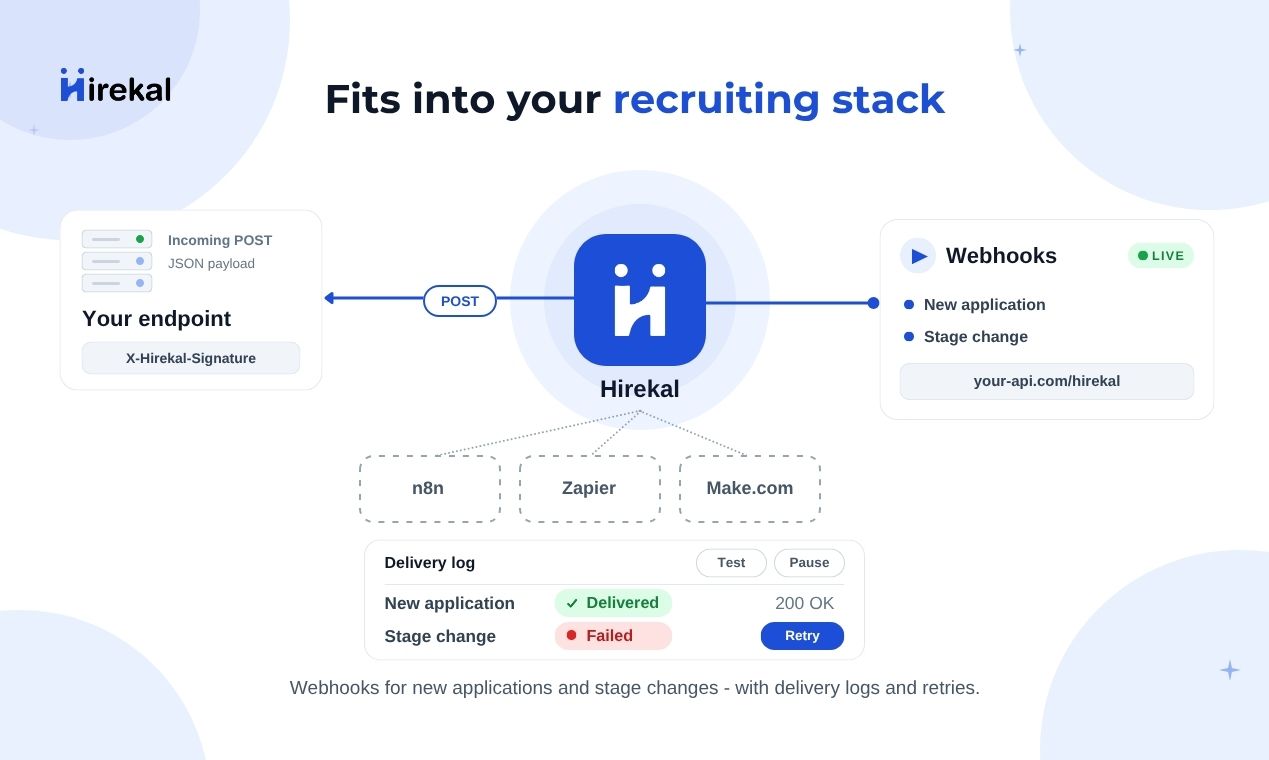
Push application and stage change events from Hirekal to a URL you control. Configure webhooks per job in the console - each job can have its own endpoint, triggers, and delivery history. See also Integrations.
How it works
When something happens on a job that you subscribed to, Hirekal sends a JSON payload to your URL right away and saves the result in Webhook Deliveries. If your server does not respond successfully, Hirekal retries automatically. You can also retry failed sends yourself from the console.
Candidate submits or stage changes
        ↓
Hirekal sends JSON to your URL
        ↓
Result saved in Webhook Deliveries
        ↓
Failed? Retry automatically (up to 3 more times)
Open Settings on a published job - see Job settings. Use Webhook Integration to configure the endpoint and Webhook Deliveries to review sends and retries.
Event types
| Event | When it fires | What you receive |
|---|---|---|
| New Application | A candidate submits an application on this job | Job summary, application contact fields, optional full answers and transcripts |
| Stage Change | An application moves to a different pipeline stage | Job summary, application summary, previous stage, current stage |
Stage-change webhooks do not fire when the stage is unchanged. When you Save or Enable an endpoint, Hirekal sends a test POST so you can confirm your server is reachable.
Toggle each event independently in Trigger Events on the webhook settings page.
Setup
Job detail → Settings → Webhook Integration.
HTTPS URL, webhook secret, then Save. Hirekal validates the URL live.
Turn on New Application and/or Stage Change. Choose payload detail level.
Enable the endpoint. Failed test connections block enable until fixed.
Where to configure
Webhooks are scoped to one job. Open the job in the console, go to Settings, then:
| Section | What it is for |
|---|---|
| Webhook Integration | Endpoint URL, secret, trigger toggles, payload options, enable/disable |
| Webhook Deliveries | History of every send, filters, manual retry for failures |
Register your endpoint
- Enter your Webhook URL - must be a valid
http://orhttps://URL (use HTTPS in production). - Hirekal generates a Webhook Secret automatically. It is sent on every delivery as the header
X-Hirekal-Signature(a shared secret your server compares - not a signed hash of the body). - Choose Trigger Events and Payload Options (below).
- Click Save. Hirekal sends a test POST to the URL before saving. If the endpoint is unreachable or returns an error, the URL is rejected and your previous configuration stays in place.
Trigger events and payload
Trigger Events
| Toggle | Fires when |
|---|---|
| New Application | Candidate completes and submits the apply flow |
| Stage Change | Recruiter or hiring manager moves the application to another stage |
Payload Options
| Toggle | What it does |
|---|---|
| Include payload details | On New Application events, adds field values, question answers, video URLs, transcripts, and speech metrics in the same send. When off, the payload stays slimmer (job + application summary only). Stage-change payloads stay compact either way. |
Use Sample payload in the console to preview JSON for each event type before you go live.
Enable and test
After saving an endpoint, click Enable to start sending events. Enable runs another test connection — if your server rejects the test (wrong secret, 401, timeout), enable is blocked until the endpoint is fixed.
You can Disable delivery without deleting the URL, or Delete to reset webhook configuration (delivery history is kept).
When webhooks fire
Webhooks are real-time — Hirekal sends as soon as the event happens, as long as the trigger is on and the endpoint is Enabled.
| Event | Fires instantly when… |
|---|---|
| New Application | A candidate submits their application |
| Stage Change | Someone moves an application to a different stage in the candidate drawer (see Collaboration) |
Turn on Include payload details if you want the New Application JSON to also include answers, video links, transcripts, and speech metrics in that same send.
Request format
Each delivery is an HTTP POST with:
| Item | Detail |
|---|---|
| Content-Type | application/json |
| User-Agent | Hirekal-Webhook/1.0 |
| X-Hirekal-Signature | Your webhook secret, when configured |
| Body | JSON - event type, timestamp, job, application, and event-specific fields |
New Application payloads include candidate contact data, apply link query params (for tracking), and - when payload details are on - field values, question answers, media URLs, transcripts, and communication metrics.
Stage Change payloads include job and application summaries plus previous and current stage.
Return any 2xx status quickly. Do heavy processing on your server after you respond - do not block the HTTP response.
Retries and delivery logs
Automatic retries
If a send fails - your server returns an error, is unreachable, or does not respond in time - Hirekal retries automatically:
| After failed attempt | Wait before next try |
|---|---|
| 1 | 30 seconds |
| 2 | 60 seconds |
| 3 | 90 seconds |
That is one initial send plus up to three retries (four attempts total). After that, the delivery is marked Failed in Webhook Deliveries. Each attempt waits up to 15 seconds for a response by default.
Webhook Deliveries
Open Settings → Webhook Deliveries on the job to see every send:
| What you see | Meaning |
|---|---|
| Sent | Your endpoint returned a successful response |
| Failed | All automatic retries were used and the send still did not succeed |
| Skipped | The webhook was disabled or the URL changed before this send finished — it will not retry |
Filter by date, event type (New Application, Stage Change), and status. Each row shows the HTTP response, response time, and a snippet of what your server returned - useful when debugging URL, secret, or timeout issues.
To try again after a failure, select one or more Failed rows and click Retry webhook. Hirekal sends the payload again using your current endpoint settings.
Security
- Use HTTPS endpoints in production.
- Compare incoming
X-Hirekal-Signatureto the secret shown in Webhook Integration before trusting the body. - Return 2xx promptly; run long-running ATS or warehouse work in the background on your side.
- Treat webhook URLs and secrets like API credentials - save a new endpoint if you need to rotate a compromised secret.