

n8n
Connect Hirekal to n8n with OAuth, start workflows from application and stage events, and look up jobs and applications.
Use the Hirekal community node in n8n to start a workflow when Hirekal receives an application or an application changes stage, and to create or look up jobs and applications. Summary on n8n.
Connect
Each Hirekal organization has its own client ID and client secret. They are created in Hirekal, not in n8n.
- In the Hirekal console, open Add-ons → Integrations → n8n → Connect.
- Copy the Client ID and Client Secret.
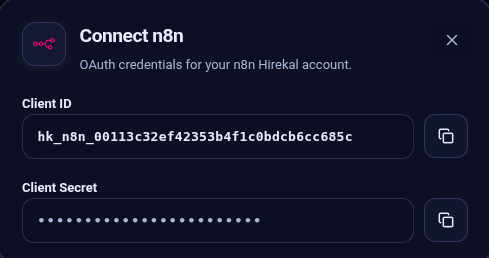
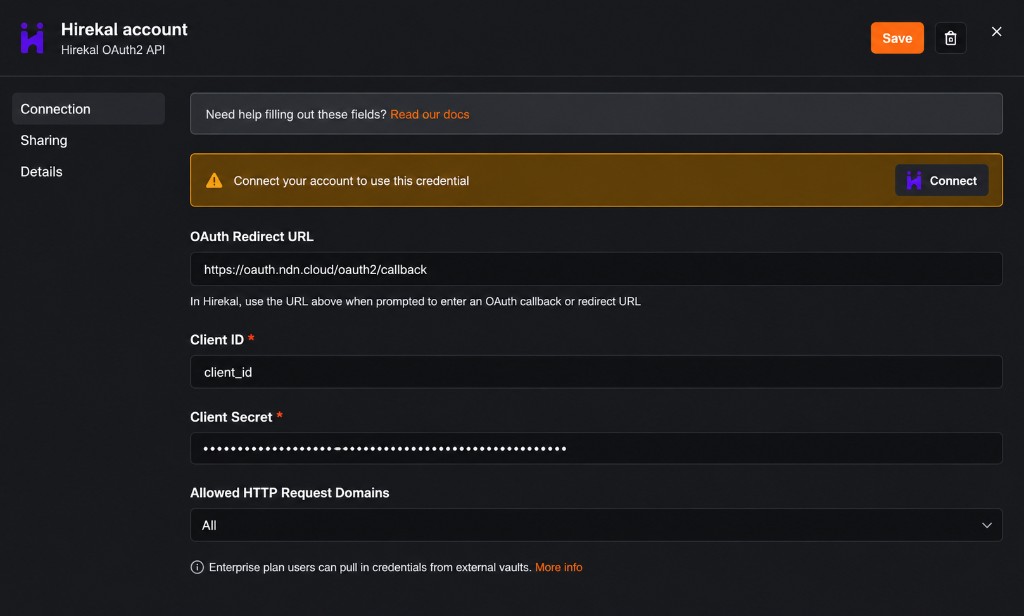
- In n8n, create a Hirekal OAuth2 API credential and paste those values.
- Click Connect and sign in to Hirekal. The token belongs to that user's organization.
- Select the same credential on Hirekal and Hirekal Trigger.
Paste the Client ID and Client Secret from Hirekal into the n8n credential:
Disconnect
Disconnect in the Hirekal console to disconnect n8n for that organization. The console shows Disconnected immediately. The next time a workflow runs, n8n asks you to reconnect the credential.
Disconnecting only inside n8n does not disconnect Hirekal. Use Disconnect in the Hirekal console for that.
Hirekal Trigger
Hirekal Trigger is the trigger node. Choose one or both events. Activating the workflow registers it with Hirekal. Deactivating removes that subscription. Per-job webhook settings in Hirekal are not changed.
| Event | When it runs |
|---|---|
| Application Received | Hirekal receives an application on any job in the organization |
| Stage Change | An application moves to another pipeline stage |
Application Received is selected by default. Include Payload Details appears only when that event is selected. When it is on, the payload can include answers, transcripts, and metrics. Hirekal may wait until AI processing finishes before sending.
Test this trigger sends one sample for each selected event.
Hirekal node
Hirekal is the action node. It uses the same Hirekal OAuth2 API credential.
Job
| Operation | What it does |
|---|---|
| Create | Create a job. Hirekal adds default questions, application fields, and pipeline stages. Title and company are required. |
| Get Many | List or search jobs. Supports status, search, sort, order, and a limit. |
| Get | Get one job by ID. |
| Get by Name | Search by title, then keep an exact or partial match. |
| Get Applications | List applications for a job. Supports stage, search, sort, and a limit. |
Status values on create are ACTIVE, PAUSED, and ARCHIVED. Location, employment type, status, company website, and internal title are optional.
Application
| Operation | What it does |
|---|---|
| Get | Get one application by ID, for the organization that connected the credential. |
Example flows
Use one Hirekal Trigger. Select the events on that node, then add the next step.
New application, then the full record
- Add Hirekal Trigger as the first node.
- In Events, select Application Received.
- Add a Hirekal node after it.
- Set Resource to Application and Operation to Get.
- Set the application ID to
{{ $json.application.id }}. That value comes from the trigger.
When a candidate applies, the trigger runs and the next node loads that application.
Stage change as well
- Open the same Hirekal Trigger.
- In Events, also select Stage Change. Both Application Received and Stage Change stay selected.
- After the trigger, send the stage names to Slack, email, or your ATS.
The workflow now starts for a new application and for a stage change. You do not add a second trigger.